
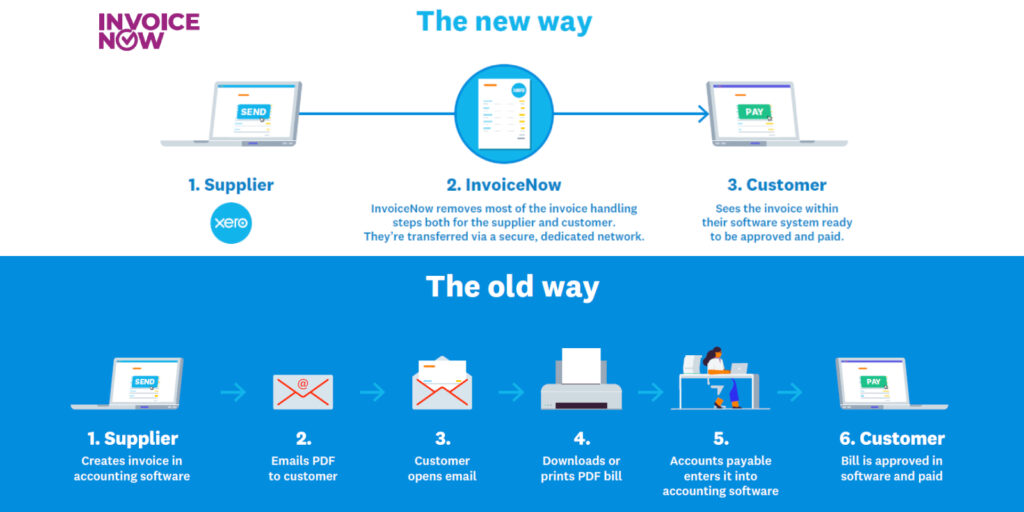
What Is InvoiceNow?
Introduced in 2019 by the Infocomm Media Development Authority (IMDA), InvoiceNow is the nationwide e-invoicing network that enables businesses of all sizes to boost productivity in invoice processing.
Operating on the international Peppol standard, InvoiceNow enables seamless transmission of e-invoices securely across different finance systems. Over 63,000 businesses in Singapore are already on the InvoiceNow network, utilising a variety of InvoiceNow services offered by InvoiceNow-Ready Solution Providers (IRSPs) and Access Point (AP) Providers.
InvoiceNow is subsidised and encouraged by the government. It has many benefits including speeding up the invoice payment process and reducing manual entry.
How to Set Up InvoiceNow in Xero Singapore? (Step-by-Step Guide)
Looking to set up InvoiceNow in Xero Singapore? This step-by-step guide shows you exactly how to connect Xero to the InvoiceNow (PEPPOL) network, enabling you to send electronic invoices directly to customers in Singapore.
Once your setup is complete, your Xero account will be InvoiceNow-enabled, allowing invoices to be delivered electronically to customers using PEPPOL-ready accounting software. This helps eliminate manual data entry, reduce invoicing errors, speed up payment processing, and improve business efficiency.
Whether you’re a small business, SME, accountant, or finance professional, this guide will help you activate InvoiceNow in Xero quickly and correctly.
Prepared by WLP Group – Winner of the Xero Asia Award 2025 e-Invoicing Champion of the Year (Singapore)
Step 1: Connect Xero to InvoiceNow via Invoici
Visit the Invoici platform at https://sg.invoici.net/splash.
From the homepage, sign in with Xero, navigate to the Integration page and click Connect to Xero to begin linking your Xero organisation to the InvoiceNow (PEPPOL) network in Singapore.

Step 2: Authorise Your Xero Organisation
Select the Xero organisation you wish to connect from the dropdown list.
Review the requested permissions and click Allow access to securely authorise the connection between Xero and Invoici.

Step 3: Verify Your Business Information
Invoici will automatically retrieve your organisation’s details from Xero. Carefully review the information and ensure your UEN (Unique Entity Number) is entered correctly, as this is required for InvoiceNow (PEPPOL) registration in Singapore.

Step 4: Confirm Your InvoiceNow Registration
Once you have verified that all information is accurate, tick the required declaration checkboxes and click Confirm Details. You will receive a confirmation message indicating that your Xero organisation has been successfully connected to the InvoiceNow (PEPPOL) network.

Step 5: Complete CorpPass and Singpass Authorisation
To activate your InvoiceNow connection, click the CorpPass button. Then, scan the displayed QR code using your Singpass app to authorise the registration.
After successful authentication, your Xero organisation will be ready to send and receive InvoiceNow e-invoices through the PEPPOL network.

How to Send InvoiceNow e-Invoices from Xero via the PEPPOL Network?
Once your InvoiceNow setup is complete, you can send PEPPOL e-invoices directly from Xero to customers who are registered on the InvoiceNow network in Singapore.
Step 1: Send Your Invoice via InvoiceNow
When your sales invoice is ready, select the Email option in Xero and enter your customer’s InvoiceNow email address. This is a unique @invoi.ci address linked to the recipient’s UEN (Unique Entity Number).
Example:
0195-SGUEN12345678D@invoi.ci
(where 12345678D is the company’s UEN).
Tip: To save time, add your customer’s InvoiceNow email address to the Contact record in Xero. If an email address already exists, click Add another person, enter the InvoiceNow email as a secondary address, and tick Include in emails. This makes it easy to send future invoices through the InvoiceNow (PEPPOL) network.

Step 2: Verify Successful Invoice Transmission
After sending the invoice, Xero will display a confirmation that the InvoiceNow e-invoice has been transmitted successfully. You can also view a unique Transmission ID in the History & Notes section of the invoice, providing an audit trail and confirmation that the invoice has been sent through the PEPPOL network.

How to Receive InvoiceNow e-Invoices in Xero?
When a supplier sends you an InvoiceNow e-invoice through the PEPPOL network, the invoice will automatically be imported into Xero as a Draft Bill.
This eliminates manual data entry, reduces the risk of errors, and streamlines your accounts payable process.
Review and Approve the Bill
Open the draft bill in Xero and verify that the invoice details are accurate. Before approving the bill:
- Assign the appropriate Chart of Accounts code (for example, Purchases, Office Expenses, or another relevant account).
- Select the correct tax rate (such as GST where applicable).
- Review the supplier information, invoice amount, and due date.
- Click Approve to finalise the bill and include it in your accounting records.
By receiving invoices electronically through InvoiceNow (PEPPOL), businesses can automate invoice processing, improve accuracy, and save valuable time on accounts payable.

InvoiceNow FAQs
GST-registered businesses will be required to use InvoiceNow-Ready Solutions to transmit invoice data directly to IRAS for tax administration. This mandatory participation will be implemented progressively in the following phases
Implementation Date
1 November 2025: Companies that register for GST voluntarily within 6 months of incorporation date.
1 April 2026: All new voluntary GST registrants regardless of incorporation date or business structure.
1 April 2028: All new compulsory GST registrants & existing GST-registered businesses with total annual supplies* ≤ S$200,000
1 April 2029: Existing GST-registered businesses with total annual supplies* ≤ S$1,000,000
1 April 2030: Existing GST-registered businesses with total annual supplies* ≤ S$4,000,000
1 April 2031: Existing GST-registered businesses with total annual supplies* > S$4,000,000
*Total annual supplies refer to the total value of standard-rated, zero-rated and exempted supplies made in all the prescribed accounting periods ending in calendar year 2025.
To know how to get connected with InvoiceNow-XERO, contact WLP Team or WhatsApp WLP Team for a free consultation!
InvoiceNow allows direct transmission of invoices in a structured digital format from one finance system to another using the nationwide e-invoicing network, which is based on Peppol.
Peppol integrates business processes by standardising the way information is structured and exchanged. Whether you are sending invoices or handling other business transactions, Peppol delivers a shared digital language for organisations all over the world. To learn more, you may refer to OpenPeppol’s website at https://peppol.org
You may also refer to the list of countries who have adopted Peppol as their standard as listed on OpenPeppol website: https://peppol.org/learn-more/country-profiles
InvoiceNow has the following benefits to businesses.
a. Simplifies invoicing across all business relationships
Leverages a single invoicing solution of your choice for all parties – including business partners and Government entities – while ensuring seamless tax compliance.
b. Reduces manual effort and boosts business efficiency:
InvoiceNow automates invoice data transmission directly into buyers’ accounting systems, eliminating the need for manual data entry and reducing errors.
c. Enhances reliability and ensures data security
Invoices are transmitted securely through the InvoiceNow network using the international Peppol standard, minimising the risk of loss or compromise.
d. Minimises compliance efforts and shortens GST audit process
With InvoiceNow-Ready Solutions, businesses can expect shorter GST audits and faster refunds as invoice data is transmitted to IRAS. Businesses can also receive auto alerts for wrongful GST charging from non-GST registered suppliers
It is the same. In Singapore, Peppol is referred to as InvoiceNow.
In a common business scenario today, an PDF e-invoice is sent to the recipient organisation by email. This is a single-sided operation requiring your recipient to re-enter the details of the invoice into their own accounting system (e.g. accounts payable). A more complete solution should include the transmission of data from supplier system to buyer system without human intervention and potentially allow for the InvoiceNow invoice to be paid seamlessly.
While the InvoiceNow network does not cover business to consumer transactions, GSTregistered businesses that are subject to the GST InvoiceNow Requirement are still required to submit invoice data for supplies made to individual consumers that are within scope to IRAS. For more details, you may refer to their e-Tax Guide on GST: Adopting InvoiceNow Requirement for GST-registered Businesses.
You will need to de-register with your currently provider before registering with us. WLP Team will guide you on the InvoiceNow process.
Contact WLP Team or WhatsApp WLP Team for a free consultation!
You can send and receive InvoiceNow e-invoices with businesses in other countries, as long as they are connected to the Peppol network.
With the introduction of Peppol International (PINT) – a framework designed to streamline global einvoicing—businesses can expect a more seamless and standardised cross-border invoicing experience.
Yes, you need to be on the Peppol network to issue InvoiceNow invoices to the Government through this network. AGD has developed a guide that explains how you may do so, and the requirements to comply with. The guide can be found here.
Yes, the network is secure.
Firstly, only Peppol certified Access points are registered on the network and are authorised with a PKI certificate issued by the governing authority.
Secondly, all data being transmitted on the network is protected with SSL transport layer security such that it only goes through securely encrypted pipes.
Thirdly, the data being transmitted is signed using the Access Points Service Provider (AP) authorised PKI certificate to ensure that the data is genuine and non-repudiable.
Lastly, any receiving Access point will check the signature of the sending Access point service provider to ensure that it is as per the authorised one registered on the network and only accept data sent by genuine Access Points.
No, sent e-invoices cannot be retrieved. The InvoiceNow network functions similarly to email, i.e. once the invoice is created/finalised and sent across the network, there is no feature/function in the network to retrieve the sent invoice.
To cancel the incorrect invoice, we recommend the supplier send out a credit note with reference to the wrongly sent invoice to cancel the incorrect data elements.
Alternatively, the supplier can instruct the e-invoice recipient to discard the incorrect e-invoice (received) and re-send a fresh one.
To minimise such issues, the sender could try saving the invoice as draft and reviewing the details before finalising and sending out to the customer.